How to Adjust the New Gmail Tabs to Get Priority Email

Pam moore keynote speaker on branding, ai, personal branding, and growth mindset

Mike Gingerich

Gmail

Google has made some big changes recently to the Gmail user interface!

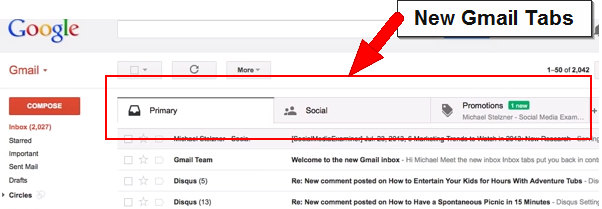
If you use Gmail, you likely noticed the new “multi tab” structure across the top.  Gmail is making it's own determination on what mail goes in each category for you!  This means some important newsletters (like from Pam ) may be dropping in the “Promotions” tab instead of the “Primary” tab.
gmail-tabs

The intent of Google is to help users with “inbox overload” and to help users see priority email.  To make sure you have mail coming into the Primary that you want, go to each tab.  If you find something in another tab that you want in the Primary area, simply drag the email to that Primary Tab (on the name Primary) at the top of the page.

Immediately after, a yellow box will appear asking, “Do this for future messages?”.  Make sure to click the “Yes” link to train Gmail to send all email from this source to your Primary tab.

Customize-inbox

Want to learn more and see this in action?

View this great Video Tutorial from Mike Stelzner of Social Media Examiner:

Video Link on YouTube: youtu.be/5Elz_1KQnmA

https://youtu.be/5Elz_1KQnmA


For Businesses….Be sure to Educate your Audience!

For any business engaged in email marketing to nurture customers and leads, it will be important to educate your audience with a post like this above!  This is important so that users do not unknowingly miss your emails by having them continue to go to the Promotions tab.

Take time to craft a blog post or message to your audiences today!  By educating them, you help ensure your communication to them is uninterrupted.


Will AI replace white-collar jobs?2026-02-17T02:43:23-05:00

AI will replace tasks and compress certain roles, especially entry-level and output based work. But leadership, accountability, and strategic judgement remain deeply human responsibilities. It's human plus machines. The power of AI is mind and machine working together.

What kind of jobs are most at risk from AI?2026-02-17T02:43:53-05:00

Jobs that rely heavily on repeatable output, predictable processes, and low-context decision-making are most vulnerable. Roles centered on coordination, creativity, leadership, and high-level strategy are evolving, not disappearing. The biggest risk isn’t automation. It’s stagnation. Make certain you are continuously learning and experimenting!

How should professionals prepare for AI disruption?2026-02-17T02:44:49-05:00

Stop waiting. Start experimenting. Learn how AI works inside your own organization and workflows. Strengthen your judgment, decision-making, and communication skills. Build adaptability. The people who thrive won’t be the most technical. They’ll be the most adaptable.

Is AI a threat to human creativity?2026-02-17T02:45:05-05:00

Stop waiting. Start experimenting. Learn how AI works inside your own organization and workflows. Strengthen your judgment, decision-making, and communication skills. Build adaptability. The people who thrive won’t be the most technical. They’ll be the most adaptable.

What does leadership look like in an AI-driven workplace?2026-02-17T02:45:18-05:00

Leadership becomes more human, not less. As automation increases, trust, clarity, and accountability matter more. Leaders must guide teams through change, reduce fear, and align technology with purpose. AI may scale execution. Leadership scales belief.

Go to Top